
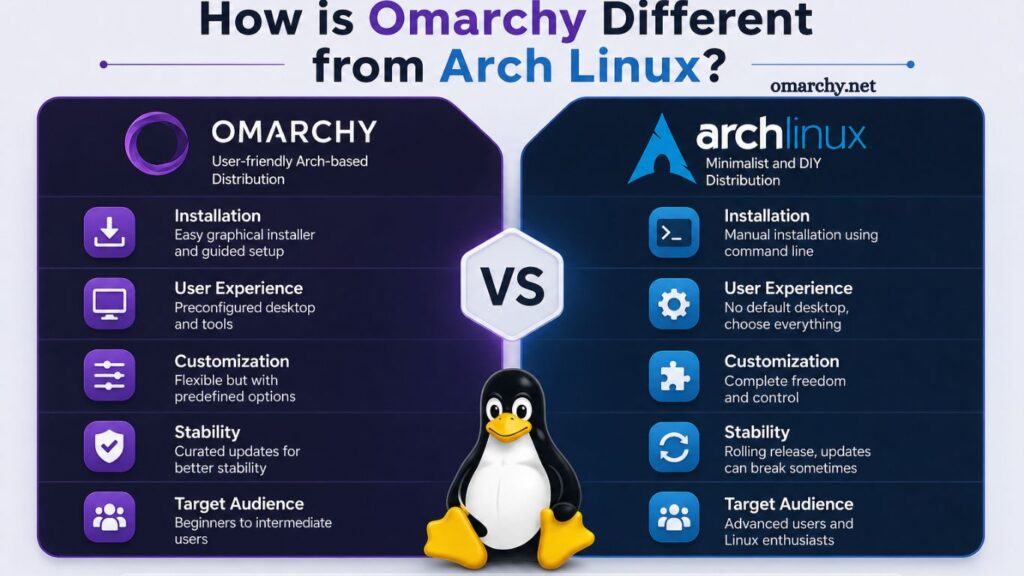
Omarchy and Arch Linux both belong to the world of lightweight, customizable Linux distributions, yet each serves a very different user base. A clear understanding of their differences helps users choose the right system based on experience level, performance needs, and desired level of control.
Arch Linux has earned a reputation as a minimalist, do-it-yourself distribution designed for advanced users. Omarchy, on the other hand, builds on similar principles but introduces convenience, structure, and preconfigured elements that reduce complexity. Comparison between the two highlights differences in installation, usability, customization, performance, and target audience.
Understanding Arch Linux
Arch Linux focuses on simplicity, transparency, and full user control. Installation begins with a barebones environment, requiring manual configuration of nearly every component. Users install only what they need, resulting in a highly optimized and lightweight system.
Rolling release model ensures continuous updates without requiring full system upgrades. Pacman, the package manager, provides access to official repositories, while the Arch User Repository (AUR) significantly expands software availability.
Read More: Step-by-Step Omarchy Installation Guide
Documentation stands out as one of Arch Linux’s greatest strengths. Arch Wiki offers detailed, community-driven guides covering almost every aspect of the system. However, reliance on documentation also means users must invest time and effort into learning.
Understanding Omarchy
Omarchy takes inspiration from Arch Linux but focuses on usability and accessibility. Preconfigured environments, simplified installation processes, and curated software selections reduce the steep learning curve typically associated with Arch.
The system often comes with a graphical installer or guided setup, eliminating the need for manual partitioning and command-line configuration. Default desktop environments, essential tools, and drivers are usually preinstalled, allowing users to start working immediately.
Omarchy aims to maintain flexibility while minimizing complexity. The balance between customization and ease of use makes it appealing to intermediate users who want control without starting from scratch.
Installation Process Comparison
Installation represents one of the most significant differences between Omarchy and Arch Linux.
Arch Linux installation requires command-line expertise. Users manually partition disks, configure filesystems, install base packages, and set up bootloaders. Each step demands attention to detail, leaving little room for error. Experience gained during installation builds deep system knowledge, but the process can be intimidating for beginners.
Omarchy simplifies this experience. Guided installers handle disk partitioning, package selection, and system configuration automatically. Reduced manual intervention speeds up setup and lowers the barrier to entry.
Ease of installation makes Omarchy more approachable, while Arch Linux prioritizes learning through hands-on configuration.
User Experience and Interface
Arch Linux provides no default desktop environment. Users choose and install their preferred interface, whether GNOME, KDE Plasma, XFCE, or a window manager. Flexibility allows complete customization but requires additional setup time.
Omarchy typically includes a preconfigured desktop environment. Carefully selected themes, tools, and layouts create a polished user experience from the start. Consistency across installations reduces decision fatigue and speeds up productivity.
User experience in Arch Linux depends entirely on individual choices. Omarchy delivers a ready-to-use environment with customization options available later.
Customization and Flexibility
Customization remains a core strength of both systems, though the approach differs.
Arch Linux offers unlimited flexibility. Minimal base installation allows users to build systems tailored to specific needs, from lightweight servers to fully featured desktop environments. Every component, including kernel, drivers, and software packages, can be selected manually.
Omarchy also supports customization, but starts with predefined configurations. Users can modify settings, install additional packages, and adjust system behavior, yet the initial structure remains more guided.
Arch Linux suits users who want total control from the beginning. Omarchy appeals to those who prefer to start with a functional system and customize gradually.
Performance and Resource Usage
Performance differences between Omarchy and Arch Linux depend largely on configuration.
Arch Linux often achieves optimal performance due to its minimal installation. The absence of unnecessary packages reduces system overhead, resulting in faster boot times and more efficient resource usage.
Omarchy may include additional preinstalled software, slightly increasing resource consumption. However, modern hardware typically handles these additions without noticeable performance impact.
Both systems deliver excellent performance when properly configured. Arch Linux provides maximum efficiency through minimalism, while Omarchy balances performance with convenience.
Package Management and Software Availability
Both distributions typically rely on Pacman and may support access to AUR. Software availability remains extensive in both environments.
Arch Linux users often interact directly with package management tools, installing and maintaining software manually. Greater control comes with increased responsibility for dependency management and system stability.
Omarchy streamlines software management by including essential applications out of the box. Preconfigured repositories and tools simplify updates and installations.
The difference lies not in availability but in user interaction. Arch Linux requires hands-on management, while Omarchy emphasizes ease and efficiency.
System Stability and Updates
The rolling release model defines Arch Linux, delivering frequent updates that keep software current. Continuous updates can occasionally introduce instability, especially if users do not monitor changes carefully.
Omarchy often implements additional testing or curated updates to improve stability for everyday use. Reduced exposure to breaking changes makes it more reliable for users who prioritize consistency.
Arch Linux suits users who are comfortable troubleshooting issues. Omarchy provides a smoother experience with fewer disruptions.
Learning Curve
The learning curve is a defining factor when choosing between these systems.
Arch Linux demands significant time investment. Installation, configuration, and maintenance require familiarity with Linux commands and system architecture. The learning process, however, rewards users with deep technical knowledge.
Omarchy reduces complexity, making it accessible to a wider audience. Guided setup and preconfigured environments allow users to focus on productivity rather than system management.
Beginners may find Arch Linux overwhelming. Omarchy offers a practical entry point into advanced Linux environments.
Community and Support
Arch Linux benefits from a large, active community. Extensive documentation, forums, and user contributions provide valuable support resources. Arch Wiki remains one of the most comprehensive Linux knowledge bases available.
Omarchy typically has a smaller community. Documentation and support resources may be more limited, though growing adoption often leads to improved community engagement over time.
Community size influences troubleshooting and learning opportunities. Arch Linux offers broader support, while Omarchy continues to expand its ecosystem.
Security Considerations
Security in both systems depends largely on user practices.
Arch Linux gives users full control over security configurations. Responsibility includes managing firewalls, updates, and permissions. Advanced users can implement highly secure setups tailored to specific requirements.
Omarchy includes sensible defaults, reducing risk for less experienced users. Preconfigured security settings provide a safer starting point, though advanced customization remains possible.
Security approach in Arch Linux emphasizes control, while Omarchy prioritizes accessibility and safety.
Target Audience
The target audience highlights the fundamental difference between Omarchy and Arch Linux.
Arch Linux targets experienced users, developers, and enthusiasts who value complete control and customization. Technical knowledge and willingness to learn play essential roles in successful use.
Omarchy appeals to intermediate users seeking a balance between flexibility and usability. Users transitioning from beginner-friendly distributions often find Omarchy a comfortable step forward.
Choice depends on experience level and willingness to manage system complexity.
Use Cases
Different use cases further distinguish these distributions.
Arch Linux excels in environments requiring precise customization, such as development workstations, minimal servers, and performance-focused systems. Flexibility makes it ideal for specialized setups.
Omarchy suits everyday desktop use, productivity tasks, and users who want a streamlined yet customizable system. Preconfigured tools and environments support immediate use without extensive setup.
Selection depends on specific needs and priorities.
Advantages of Arch Linux
- Complete control over system configuration
- Minimal base installation ensures efficiency
- Extensive documentation and community support
- Access to vast software repositories, including AUR
- Continuous updates throughthe rolling release model
Advantages of Omarchy
- Simplified installation process
- Preconfigured desktop environment and tools
- Reduced learning curve for new users
- Balanced approach to customization and usability
- Improved stability through curated updates
Challenges of Arch Linux
- Complex installation process
- Steep learning curve
- Potential instability from frequent updates
- Requires active system maintenance
Challenges of Omarchy
- Smaller community compared to Arch Linux
- Less granular control during initial setup
- Slightly higher resource usage due to preinstalled components
Frequently Asked Questions
What is the main difference between Omarchy and Arch Linux?
Omarchy offers a more user-friendly and preconfigured experience, while Arch Linux focuses on minimalism and full manual control.
Is Omarchy based on Arch Linux?
Yes, Omarchy is inspired by Arch Linux and often uses similar package management systems and repositories.
Which is easier to install, Omarchy or Arch Linux?
Omarchy is easier to install thanks to its guided setup, whereas Arch Linux requires manual installation with command-line tools.
Is Arch Linux better for advanced users?
Arch Linux is ideal for advanced users who want complete control over system configuration and are comfortable with technical setups.
Does Omarchy support the Arch User Repository (AUR)?
Most Omarchy systems support AUR, allowing access to a wide range of community-maintained software packages.
Which distribution is more stable, Omarchy or Arch Linux?
Omarchy may offer greater stability through curated updates, while Arch Linux can occasionally run into issues due to its frequent rolling updates.
Can beginners use Omarchy instead of Arch Linux?
Beginners can use Omarchy as a starting point since it reduces complexity while still offering customization similar to Arch Linux.
Conclusion
Omarchy and Arch Linux share a common foundation but serve different user needs. Arch Linux delivers unmatched control, customization, and performance for advanced users willing to manage every detail. Omarchy, in contrast, simplifies the experience with a ready-to-use system that still offers flexibility. Choice ultimately depends on technical skill level and preference for convenience versus full control.